HQoS Configuration Guide
Introduction
HQoS (Hierarchical Quality of Service) is an advanced traffic management mechanism. By employing multi-level queue scheduling and shaping strategies, it enables granular bandwidth control and priority assurance for complex network traffic. This optimizes bandwidth utilization efficiency and ensures the service quality of critical applications (such as voice, video, etc.).
Traditional QoS technologies typically manage traffic at a single network node or interface. In contrast, HQoS introduces the hierarchical concept, allowing for nested traffic management across multiple dimensions simultaneously (e.g., the overall link, user groups, individual users, and different service types within a user). This makes HQoS particularly well-suited for network environments with diverse application scenarios.
HQoS Configuraton
Global HQoS switch
Operation | Command | Description |
|---|---|---|
Enter the system configuration view | configure | |
Globally enable HQoS | hqos enable | |
Create a global HQoS configuration
Operation | Command | Description |
|---|---|---|
Enter the system configuration view | configure | |
Create a global HQoS configuration | hqos-profile name | The following configurations are performed within the global HQoS configuration view |
Configure global rate limiting | global rate byte/s | Unit: byte/s |
Bind custom user groups | user-group-profile {fuzzymatch user-group-name|postmatch user-group-name|prematch user-group-name|user-group-name} {shaping pir byte/s pbs bytes} | supports batch binding of user groups using the following match modes:fuzzymatch: Fuzzy match; postmatch: Post-match; prematch: Pre-match; Individual rate limiting can be configured for user groups |
Bind custom users | user-profile {fuzzymatch user-name|postmatch user-name|prematch user-name|user-name} {shaping pir byte/s pbs bytes} | supports batch binding of users using the following match modes:fuzzymatch: Fuzzy match; postmatch: Post-match; prematch: Pre-match; Individual rate limiting can be configured for users |
Configure rate limiting for the default user group | default-group-profile shaping pir byte/s pbs bytes | Users not bound to any custom user group belong to the default user group |
Configure rate limiting for the default user | default-user-profile shaping pir byte/s pbs bytes | Users that are not custom users belong to the default user |
Create custom user group configuration
Operation | Command | Description |
|---|---|---|
Enter the system configuration view | configure | |
Create Custom user groups | hqos-user-group-profile name | The following configurations are performed within the custom user group view |
Bind custom users | user-profile {fuzzymatch user-name|postmatch user-name|prematch user-name|user-name} {shaping pir byte/s pbs bytes} | supports batch binding of users using the following match modes:fuzzymatch: Fuzzy match; postmatch: Post-match; prematch: Pre-match; Individual rate limiting can be configured for users |
Bind DSCP-type priority mapping relationships | qos-map bind dscp_to_tc qos-map-name | note that the DSCP-type priority mapping table must be created before binding |
Create custom user configuration
Operation | Command | Description |
|---|---|---|
Enter the system configuration view | configure | |
Create custom user | hqos-user-profile name | The following configurations are performed within the custom user view |
Configure TC scheduling mode and rate limiting | tc-queue sequence-number mode strict|dwrr {shaping pir byte/s pbs bytes} | |
Bind DSCP-type priority mapping relationships | qos-map bind dscp_to_tc qos-map-name | note that the DSCP-type priority mapping table must be created before binding |
Create custom user configuration
Operation | Command | Description |
|---|---|---|
Enter the interface view | interface ethernet interface-id | |
bind the HQoS configuration on the interface | hqos-profile name {shared|offload} | By default, the normal mode is used, meaning each port operates independently.In shared mode, all interfaces bound to this HQoS configuration file share the rate limit specified in the configuration. |
Example of HQoS Configuration
Network requirements
The company's total egress bandwidth is 800 Mbps. Departments A and B under the company are allocated 400 Mbps each. Within Department A, video conferencing traffic requires priority scheduling and is guaranteed 100 Mbps of bandwidth.
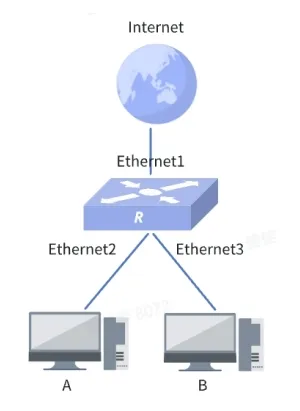
Procedure
1.Enable the HQoS function
sonic(config)# hqos enable2.Create users for Department A and Department B
sonic(config)# hqos-user-profile A
sonic(config-user-A)# exit
sonic(config)# hqos-user-profile B
sonic(config-user-B)# exit
sonic(config)# access-list L3 A ingress
sonic(config-L3-acl-A)# rule 1 src-ip 1.1.1.1/24 set-hqos-user A packet-action permit
sonic(config-L3-acl-A)# exit
sonic(config)# access-list L3 B ingress
sonic(config-L3-acl-B)# rule 1 src-ip 2.1.1.1/24 set-hqos-user B packet-action permit
3.Create user groups for both departments and configure rate limiting for each department
sonic(config)# hqos-user-group-profile A
sonic(config-group-A)# user-profile A shaping pir 400000000 pbs 1000000
sonic(config-group-A)# exit
sonic(config)# hqos-user-group-profile B
sonic(config-group-B)# user-profile B shaping pir 400000000 pbs 1000000
sonic(config-group-B)# exit
4.Configure priority scheduling and bandwidth guarantee for the video conferencing traffic in Department A
sonic(config)# qos map dscp_to_tc dscp 46 1
sonic(config)# hqos-user-profile A
sonic(config-user-A)# tc-queue 1 mode strict shaping pir 100000000 pbs 1000000
sonic(config-user-A)# exit
5.Create a global HQoS configuration and bind the user groups to it
sonic(config)# hqos-profile test
sonic(config-hqos-test)# user-group-profile A
sonic(config-hqos-test)# user-group-profile B
6.Apply the configuration to the port
sonic(config)# interface ethernet 1
sonic(config-if-1)# hqos-profile test
sonic(config-if-1)# interface ethernet 2
sonic(config-if-2)# acl A priority 1
sonic(config-if-2)# interface ethernet 3
sonic(config-if-3)# acl B priority 2